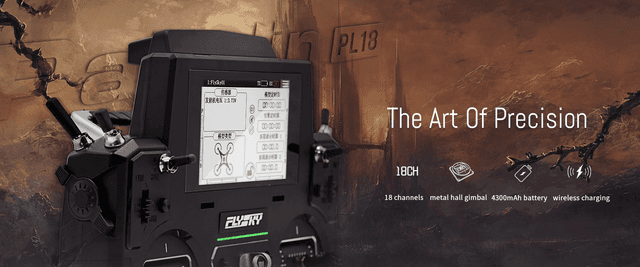
EdgeTX widgets for the FlySky PL18
28 community-made widgets fit the FlySky PL18's 480x272 color touchscreen. Each one is a free Lua widget you can download, copy to your SD card and pick from the radio's screen setup.
FlySky: Touchscreen (EdgeTX support may vary by version).
Design your own FlySky PL18 widgetWidgets for the FlySky PL18

monochrome
V@Valon Hajredini
16
01Jan 28 at 01:47 PM
tetris
V@Valon Hajredini
15
00Feb 11 at 08:58 AM
Ares
M@Michael
13
00Mar 13 at 01:44 PM
Test-2
S@Steven Cox
11
00Jan 23 at 10:26 AM
snake
V@Valon Hajredini
10
00Feb 11 at 08:59 AM
test3
N@newticker
9
01Apr 4 at 01:57 PM
noWay
C@Captain Howdy
7
00Feb 5 at 11:14 PM
Widget2
P@pascal faytout
7
00Dec 26, 2025 at 10:57 AM
SpeedoMeter
V@Valon Hajredini
6
00Jan 12 at 01:53 AM
first
?@anonymous
6
00Feb 5 at 01:50 PM
def3
V@Victorien Vieira
6
00May 22 at 02:23 PM
P1
R@ritchy
5
00Jan 24 at 08:04 PM
Widget4
P@pascal faytout
4
00Feb 11 at 04:56 AM
admin
М@Максим
4
00Aug 17 at 11:22 AM
Test_widget
M@Motti Shonak
3
00Feb 5 at 08:58 PM
Test
S@Steve Barrow
3
00Feb 5 at 11:14 AM
Switches
X@xs400dohc
2
00Feb 17 at 09:47 AM
7_segments
E@E H
2
00Jan 9 at 10:06 PM
ELRS_Quad
S@Steven Cox
1
00Jan 24 at 10:00 AM
BatteryManager
S@Simon Somers
1
00Mar 15 at 07:57 AMdef3-fork3
?@anonymous
1
00Sep 20 at 02:11 PM
WithDigitalBackgrondImag...
V@Valon Hajredini
0
00Feb 9 at 03:45 AM
Flo5KV1
F@flo röhr
0
00Oct 19 at 06:22 AM
Meto5
M@Mohamed Metwally
0
00Feb 2 at 02:12 PMFork of Widget2 (Copy)
B@Bernardo Fioramonti
0
00Apr 15 at 08:22 PMFork of Widget2 (Copy)
B@Bernardo Fioramonti
0
00Apr 15 at 08:22 PM
TwinStar
?@anonymous
0
0010:06 AM
TwinStar
?@anonymous
0
0010:08 AMHow to install a widget on the FlySky PL18
- Open a widget above and click Download. You get a ZIP built for 480x272 screens.
- Unzip it and copy the folder inside
WIDGETSto/WIDGETS/on the FlySky PL18's SD card, so the script sits at/WIDGETS/<folder>/main.lua. - Restart the radio, open Screens setup, pick a layout and a widget zone, and select the widget (you can tap through these menus on the touchscreen).
- Widgets need EdgeTX 2.8 or newer on the radio.
Radios that share the FlySky PL18's screen
Widgets made for any of these 480x272 radios also run on the FlySky PL18.